

For most sites, the best WordPress statistics plugin counts visitors without writing every hit into your WordPress database and without setting cookies. The choice that matters is the plugin's architecture, not its feature list. Some plugins log traffic into your own database. Some connect wp-admin to a cookie-based tag platform. Others are hosted cookieless tools that keep the data off your server. That one decision sets your page speed, whether you need a consent banner, and how large your database will be a year from now.
TL;DR:
- WordPress statistics plugins come in three architectures: self-hosted loggers, connectors to cookie-based tag platforms, and hosted cookieless services. The architecture matters more than the feature list.
- A self-hosted plugin on a site with 1,000 daily visitors viewing three pages each can add roughly 1.1 million database rows a year unless it prunes old data.
- Full-page caching and server-side hit counting conflict. Either the plugin undercounts cached pages, or it adds a PHP request and a database write to every pageview.
- "Cookieless" does not automatically mean "no consent needed" under EU rules. The legal test is what the tool reads or stores on the device and what it does with the data.
- For one small WordPress site, a self-hosted plugin with pruning turned on is fine. If you run several sites or care about speed, a hosted cookieless tool is the better pick.
Table of Contents
- How WordPress Statistics Plugins Actually Work: Three Architectures
- The Database Bloat Problem, With Real Numbers
- The Page-Caching Trap Nobody Mentions
- Cookies, Consent Banners, and Why "Cookieless" Isn't a Legal Blank Check
- Speed Cost: What a Tracking Script Does to Core Web Vitals
- Free vs. Paid WordPress Statistics Plugins: What the Money Actually Buys
- When the Obvious Pick Is Wrong: Three Situations
- How to Choose a WordPress Statistics Plugin in 15 Minutes
- Get Visitor Stats Without Growing Your Database or Adding a Banner
- Frequently Asked Questions
- Sources
How WordPress Statistics Plugins Actually Work: Three Architectures
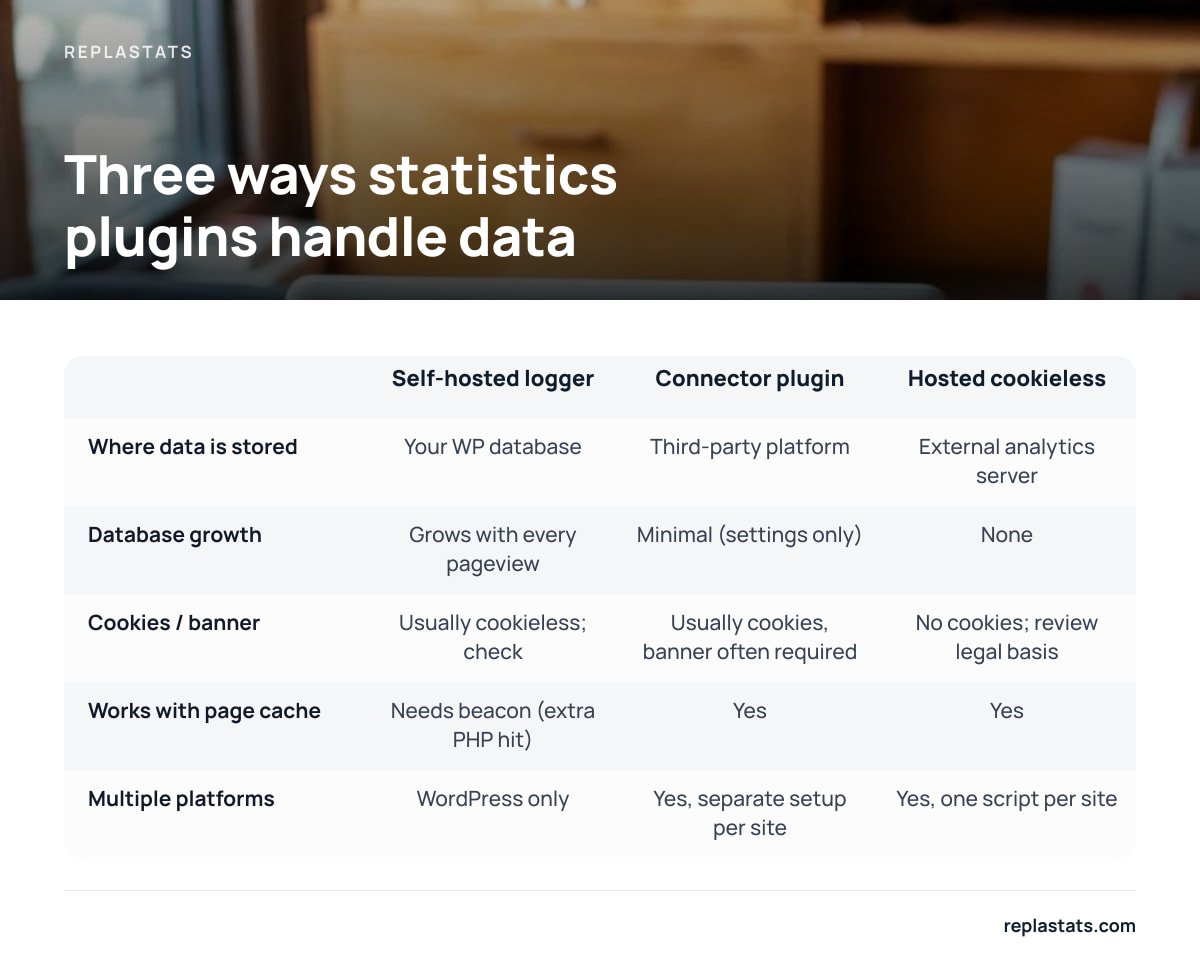
Every plugin in this category looks similar from the dashboard: charts, top pages, referrers. Underneath, they work in one of three ways, and each way brings its own costs.
Self-hosted loggers
Data lives in your WordPress database. The plugin records each visit, usually through a small JavaScript beacon that calls the WordPress REST API or admin-ajax. It then writes a row to custom tables in the same MySQL or MariaDB database that runs your site. Per the WordPress hosting requirements, that is the single database holding your posts, users, and orders. The upside is ownership, since no third party sees the data. The downside is that your traffic statistics grow inside your production database.
Connector plugins for tag-based platforms
Data lives with a third party, and reports are piped into wp-admin. These plugins mostly exist to install a tracking tag and show a simplified view of a much larger analytics platform. The tag usually sets cookies, so in many jurisdictions you will need a consent banner. Visitors who decline are typically not counted the same way, which leaves gaps in your numbers.
Hosted cookieless services
Data lives on a separate analytics server, with no cookies set. A small deferred script sends a lightweight request for each pageview to an external service, which handles counting and storage. Your WordPress database never sees the traffic. Some of these services also offer a WordPress plugin that shows the reports inside your dashboard.
| Architecture | Where data is stored | Database growth | Cookies / banner | Works with page cache | Multiple platforms |
|---|---|---|---|---|---|
| Self-hosted logger | Your WP database | Grows with every pageview | Usually cookieless; check | Needs AJAX/REST beacon (extra PHP hit) | WordPress only |
| Connector plugin | Third-party platform | Minimal (settings only) | Usually cookies, banner often required | Yes | Yes, but separate setup per site |
| Hosted cookieless | External analytics server | None | No cookies; review legal basis | Yes | Yes, one script per site |
The Database Bloat Problem, With Real Numbers

The cost of self-hosted logging is easy to underestimate because it builds up slowly. Here is the arithmetic for a modest site.
A site with 1,000 visitors a day, each viewing three pages, produces 3,000 pageviews daily. If the plugin stores one row per pageview, that is 3,000 rows a day and about 1.1 million rows a year. Some plugins also write separate rows for visitors, sessions, and referrers, so the real figure can be higher.
1,000 visitors a day viewing three pages each comes to about 1.1 million rows a year, all in the same database that serves your checkout.
Backups get slower and bigger. Most WordPress backup tools dump the whole database. A statistics table that has grown to hundreds of megabytes gets copied every night, along with the content you actually care about.
Migrations and staging copies get painful. Cloning a site to staging means moving every historical pageview, unless you remember to exclude the table first.
Queries compete for the same resources. On shared or entry-level hosting, a dashboard report that scans a large statistics table uses the same CPU and memory that your visitors' page loads rely on.
Uninstalling doesn't always clean up. Some plugins leave their custom tables behind after deactivation. The data remains, invisible, in every future backup.
We cover the cleanup side in detail in our guide to analytics plugins without database bloat. If you keep a self-hosted plugin, the short version is to turn on data pruning from day one. Ninety days of raw hits is plenty for most small sites.
Pro Tip: Before you pick a plugin, find out how big your existing statistics tables are. In phpMyAdmin or your host's database tool, run SELECT table_name, ROUND((data_length + index_length) / 1024 / 1024, 1) AS mb FROM information_schema.tables WHERE table_schema = DATABASE() ORDER BY mb DESC;. If a statistics or log table sits near the top of that list, above wp_posts, your current plugin is costing you more than you realized. The same query also reveals orphaned tables left behind by plugins you deleted years ago.
The Page-Caching Trap Nobody Mentions

This is where the obvious answer, "just keep the data on your own server," breaks down on a well-optimized site.
Full-page caching, whether from a caching plugin, your host, or a CDN, serves stored HTML without running PHP at all. A statistics plugin that counts visits in PHP while the page renders will miss every cached hit. That can be most of your traffic.
Self-hosted plugins solve this with a JavaScript beacon that calls back to WordPress after the page loads. That fixes the count, but it means every pageview now triggers an uncached PHP request plus a database write. You have spent effort making pages skip PHP, and the statistics plugin brings PHP back for every single visitor.
Hosted tools avoid the trade-off because the beacon goes to a different server. Your cache stays fully effective, and your origin server never knows a pageview happened.
Cookies, Consent Banners, and Why "Cookieless" Isn't a Legal Blank Check
Banner rules depend on what a tool does on the visitor's device, not on the label in its marketing.
In the EU, Article 5(3) of the ePrivacy Directive requires consent before storing or accessing information on a user's device, unless it is strictly necessary for a service the user requested. Analytics generally doesn't meet that "strictly necessary" exemption. That is why cookie-based tag platforms usually come with a banner.
Avoiding cookies does not end the analysis. The European Data Protection Board published guidelines in 2023 on the technical scope of Article 5(3). They make clear that the rule can cover tracking techniques beyond cookies, including pixels and some URL- and IP-based methods. A tool that fingerprints devices without cookies is not automatically exempt.
National regulators have drawn the line in different places. France's CNIL has published conditions under which audience-measurement tools can be exempt from consent. In broad terms, the tool must be used strictly for measurement, must produce anonymous statistics, and must not track people across sites or combine the data with other processing.
The practical takeaway is to choose a tool that sets no cookies, does no fingerprinting, and stores no personal identifiers. Then confirm the legal basis with whoever advises you on privacy, because rules vary by country. Our comparison of analytics tools that work without a consent banner goes further into this.
Speed Cost: What a Tracking Script Does to Core Web Vitals
Google's Core Web Vitals guidance on web.dev defines a "good" experience as Largest Contentful Paint within 2.5 seconds, Interaction to Next Paint under 200 milliseconds, and Cumulative Layout Shift below 0.1, measured at the 75th percentile of page loads.
Script weight matters less than script behavior. A tracker loaded with defer runs after the HTML has been parsed, so it won't block the first render. A tracker that loads synchronously in the <head>, or pulls in a chain of additional scripts, can delay rendering and add main-thread work that hurts INP.
Consent banners have their own cost. A banner is often a script, a stylesheet, and a layout element appearing above your content. On mobile, the banner is frequently the largest element on screen, which can make it the element your LCP gets measured against.
Server-side work counts too. The AJAX beacon described above won't show up in a lab test of the page. It does show up in your server's response times when traffic spikes.
A deferred script under 5 KB and no banner is the lightest analytics setup you can run. Anything heavier should earn its weight with features you actually use.
Free vs. Paid WordPress Statistics Plugins: What the Money Actually Buys
Free tiers are good enough for a lot of sites. Paying makes sense when you need features that are expensive to provide.
What free usually covers. Visitor and pageview counts, top pages, referrers, countries, and devices. For a blog or brochure site, that is often everything you need.
What paid usually adds. Longer data retention, session replays, heatmaps, goal and revenue tracking, more sites per account, team access, and email reports. Replays and heatmaps cost real money because the provider has to store far more data per visit. If you're unsure whether they would help, our explainer on what heatmaps actually show you on WordPress is a good place to start.
The hidden cost of "free" self-hosted plugins. The license may be free, but storage, backup time, and server load are paid for through your hosting bill. When a site outgrows entry-level hosting, it is sometimes because of the statistics tables.
The hidden cost of "free" tag platforms. You pay in setup time, in the consent banner, and in the learning curve. Many site owners install one, never learn the reporting interface, and end up checking it twice a year.
When the Obvious Pick Is Wrong: Three Situations
You run sites on more than one platform. A WordPress-only plugin covers your WordPress sites and nothing else. If you also run a Shopify store, a Squarespace client site, or a static landing page, you end up with several dashboards and several logins. A script-based tool covers all of them, including plain HTML pages.
You have one tiny site on generous hosting and strong privacy needs. In this case, a self-hosted plugin with pruning turned on is a perfectly reasonable choice. The bloat problem grows with traffic, and at a few hundred visits a day it stays small.
You run WooCommerce on shared hosting. Avoid anything that writes to the database on every pageview. Your order tables and your statistics tables would compete for the same resources, and checkout speed matters more than a referrer chart.
How to Choose a WordPress Statistics Plugin in 15 Minutes
- Count your sites and platforms. One WordPress site means any architecture can work. Several sites, or any non-WordPress site, points you toward a hosted script.
- Check your caching setup. If you use full-page caching, rule out plugins that count in PHP and don't use a beacon.
- Decide on the banner question. If you'd rather not run a consent banner, rule out anything that sets cookies, and review your legal basis for the rest.
- Look at your current database. Run the size query from the Pro Tip above. If you're already carrying a large statistics table, export what you need and drop it.
- List the two reports you'll actually open. For most people, that's "where did visitors come from" and "which pages did they read." Pick the simplest tool that answers both.
Our broader WordPress analytics plugin guide covers the install and migration steps if you're switching from an existing setup.
Get Visitor Stats Without Growing Your Database or Adding a Banner
Replastats is built for the problems described above. It installs with a single 4.7 KB deferred script, or through a pre-connected WordPress plugin that shows reports inside wp-admin. Visitor data goes to a separate server, so your WordPress database, backups, and page cache are untouched. It sets no cookies, so you don't need a consent banner. If you run sites on Shopify, Squarespace, Wix, Webflow, or plain HTML, the same script works there too.
The free tier covers one site with visitors, sources, top pages, and live traffic. Starter adds longer history, session replays, and heatmaps. Pro and Agency add a multi-site board and the option to ask Claude questions about your analytics. Check the pricing page for current rates. One honest limit: it is a deliberately simple tool. If you need custom event funnels or deep attribution modeling, read the spec sheet, ours included, before you switch.
Frequently Asked Questions
What is the best free WordPress statistics plugin?
For a single low-traffic site, a free self-hosted plugin with data pruning enabled works well. If you run several sites or use full-page caching, a free tier from a hosted cookieless service is usually the better choice, because it keeps traffic data out of your WordPress database.
Do WordPress statistics plugins slow down my site?
They can, in two ways. A script that loads synchronously can delay rendering. A self-hosted plugin that writes to the database on every pageview adds server load that page caching can't absorb. A small deferred script that sends data to an external server avoids both problems.
Does a cookieless analytics plugin mean I don't need a consent banner?
Not automatically. EU rules under Article 5(3) of the ePrivacy Directive cover more than cookies, and regulators such as France's CNIL set specific conditions for consent exemptions. A tool that sets no cookies, does no fingerprinting, and stores no personal identifiers is the safest starting point, but you should still confirm with your privacy adviser.
Why does my statistics plugin show fewer visits than my server logs?
Server logs count every request, including bots, crawlers, and asset fetches. Analytics tools filter most of that out. If the gap is very large and you use page caching, your plugin may also be missing cached pageviews because it counts in PHP instead of using a JavaScript beacon.
How do I remove old statistics data from my WordPress database?
First check the plugin's settings for a pruning or retention option, and set it to keep only the history you need. If you've already uninstalled the plugin, use phpMyAdmin or your host's database tool to find its leftover tables, take a backup, and then drop them.
Sources
- Directive 2002/58/EC (ePrivacy Directive) | EUR-Lex, European Union
- Guidelines 2/2023 on Technical Scope of Art. 5(3) of ePrivacy Directive | European Data Protection Board
- Audience measurement and consent exemptions | CNIL
- Web Vitals | web.dev (Google)
- WordPress Hosting Requirements | WordPress.org